Add a button to the bottom of every page
Before you start
- You need access to the Control Panel with permission to manage the Developer Framework.
Note: This script is a sample, not officially supported by Interact Technical Support. Review and test it with your development team before use, as it may need amends to work in your environment.
Overview
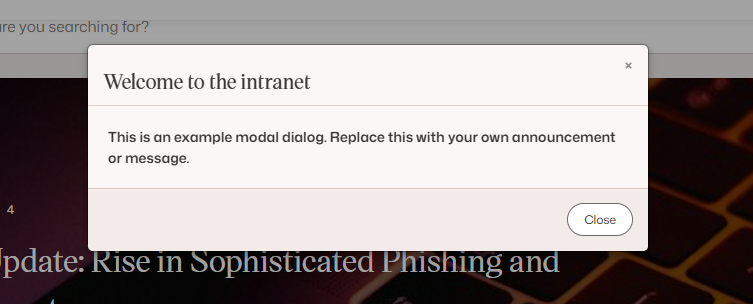
The script below adds a button to the bottom right of every page. When a user selects it, a modal dialog opens with further details. Add the script to MasterPage JavaScript in the Developer Framework.
The script
 $(document).ready(function() {
      var customModal = $('<div class="custom-modal modal fade" tabindex="-1" role="dialog" aria-hidden="true">' +
        '<div class="modal-header">' +
        '<button type="button" class="close" data-dismiss="modal" aria-hidden="true">×</button>' +
        '<h3>Welcome to the intranet</h3>' +
        '</div>' +
        '<div class="modal-body" style="padding:20px">' +
        '<p><strong>This is an example modal dialog. Replace this with your own announcement or message.</strong></p>' +
        '</div>' +
        '<div class="modal-footer">' +
        '<button class="btn" data-dismiss="modal">Close</button>' +
        '</div>' +
        '</div>');

      $('<div/>', {
          'id': 'myDiv',
          'text': 'Show announcement'
        })
        .on('click', function() {
          $('body').append(customModal);
          $('.custom-modal').modal();
        })
        .appendTo('body')
        .css({
          'font-family': 'arial',
          'position': 'fixed',
          'bottom': '0',
          'background-color': '#32cbeb',
          'color': 'black',
          'font-weight': 'bold',
          'cursor': 'pointer',
          'border-radius': '10px 10px 0 0',
          'right': '10px',
          'padding': '10px 15px 5px',
        });
    });
The script creates a div that houses the button and appends it to the body of the page, positioned at the bottom right of the screen. It then adds a click handler so that selecting it shows a small modal dialog with further details.
The button
When the script is added, the button looks like this:

Selecting the blue button at the bottom of the page shows the modal dialog: