SCIM v2.0
Before you start
- You need to be a Power User to add a profile source and generate an authentication token.
- You need access to the system of record (for example Microsoft Entra ID or Okta) that will send SCIM requests to Interact.
Overview
SCIM (System for Cross-domain Identity Management) v2.0 is a standard for provisioning users and groups between systems. Interact supports SCIM v2.0 for user provisioning, group provisioning, and the associated profile information, giving you an all-in-one profile management experience in accordance with RFC 7642, 7643 and 7644.
Interact provides a number of schema extensions that cover all profile fields and additional profile functionality, and that let you set and update those fields via SCIM when you create or update a user.
Several schemas are supported. See Supported schemas below.
Note: This page is the technical reference for Interact's SCIM support. The tables below list every supported endpoint and action. Your instance also serves the authoritative, instance-specific specification live from its service configuration and schema endpoints.
Step 1: Create a SCIM profile source
As a Power User, go to Control Panel > Profile Sources (listed under Configuration, Integrations, and Advanced Settings).
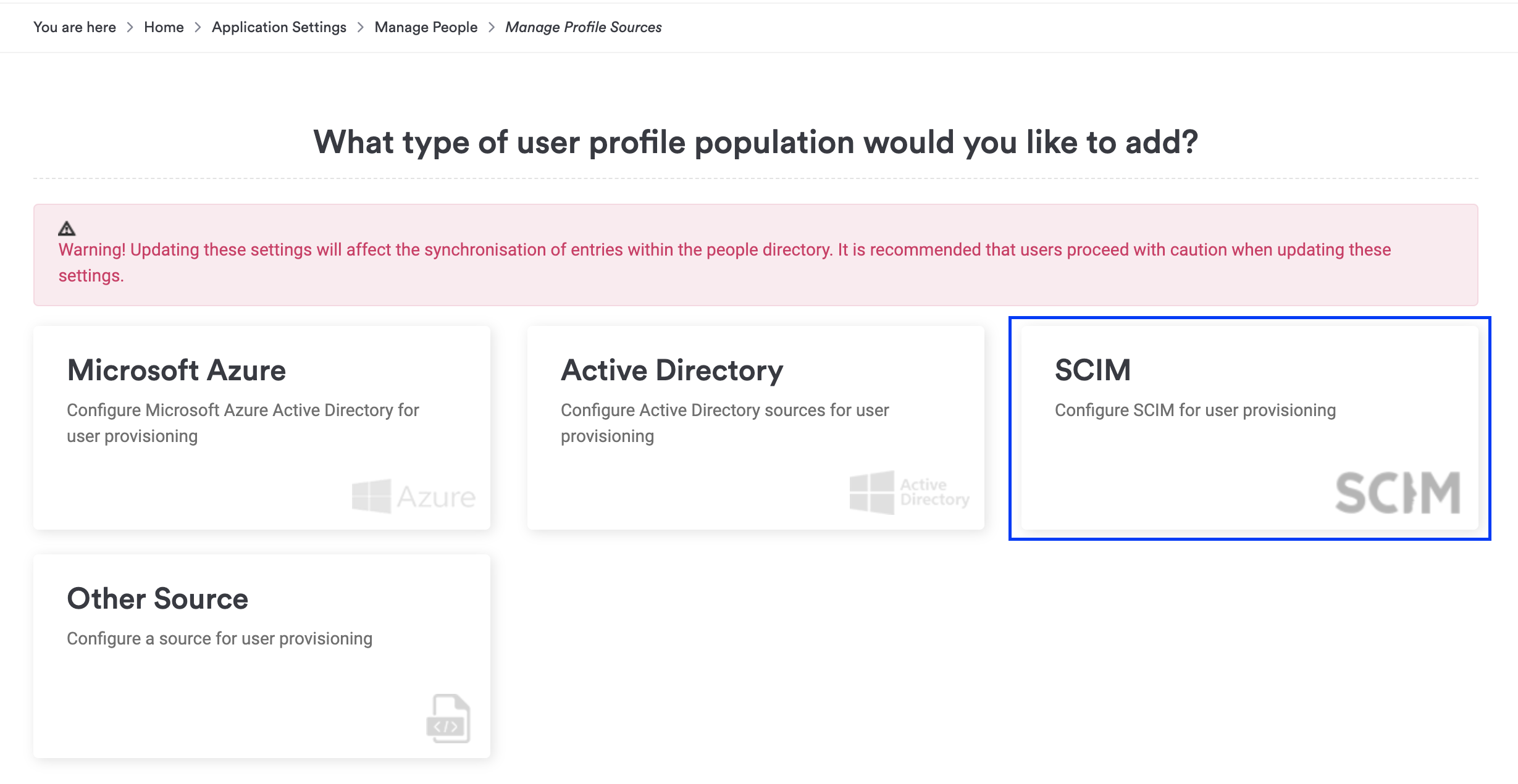
Select SCIM.
Enter a user-friendly name, select Generate Key, and make sure the Active checkbox is selected. Also select Log Request Body in SCIM Service to enable more verbose logging.
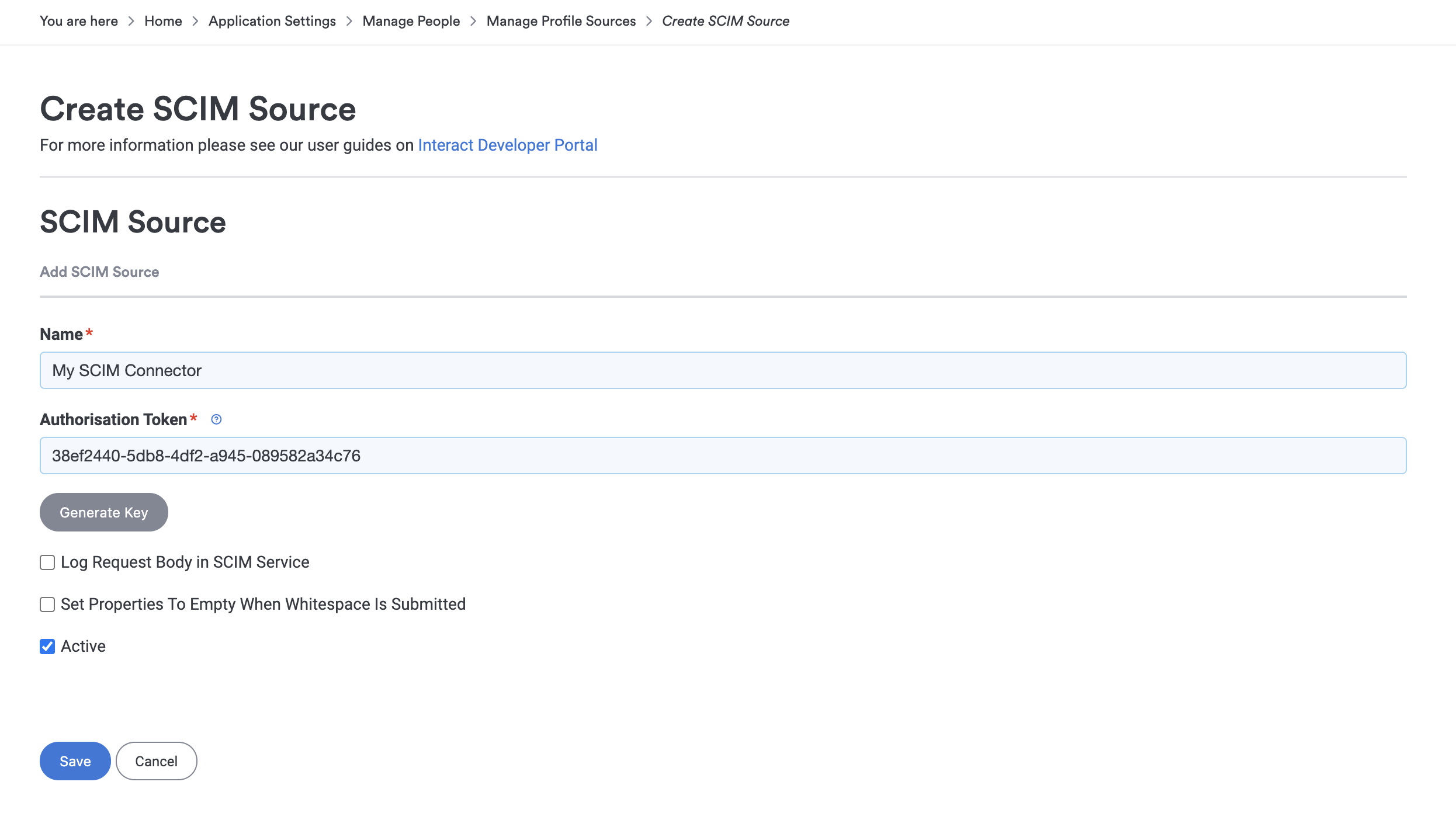
Keep a copy of the Authentication Token. You need it to set up SCIM provisioning in your system of record.
Step 2: Retrieve your SCIM configuration settings
As a Power User, go to Control Panel > Profile Sources (listed under Configuration, Integrations, and Advanced Settings).
Find the existing SCIM profile source.
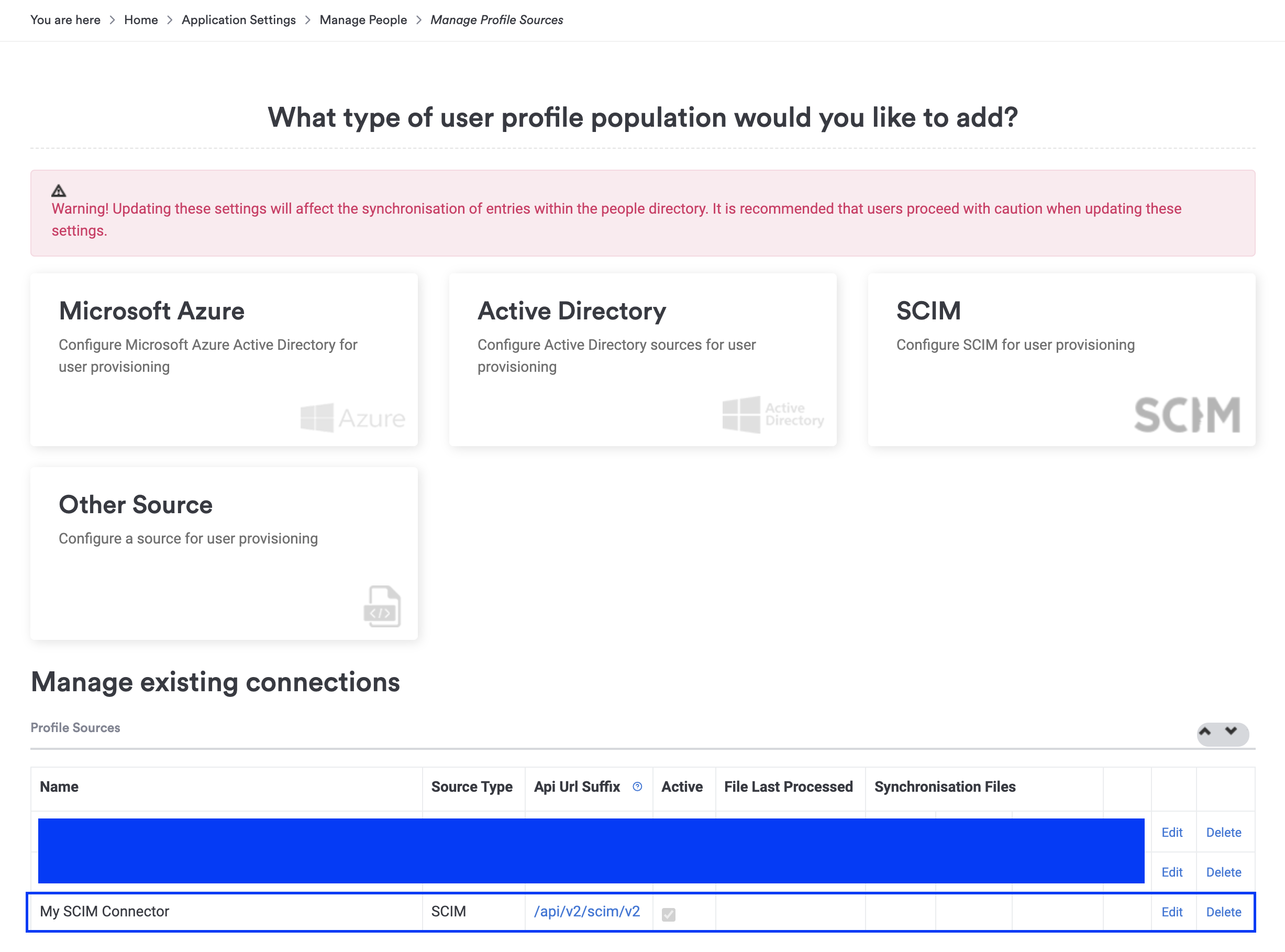
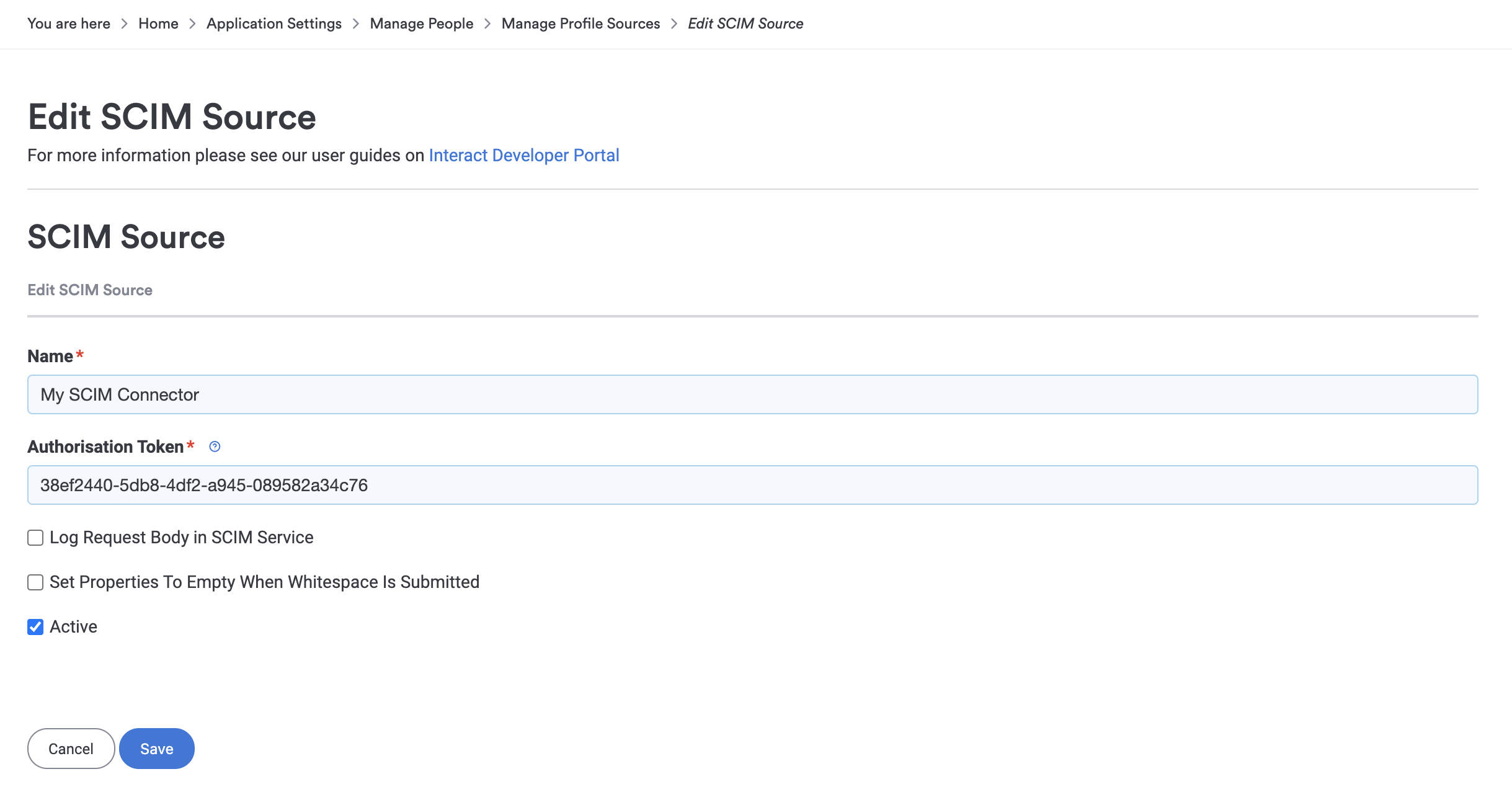
You can find the Authentication Token by editing the profile source, and you can find the SCIM URL endpoint in the table (the Api Url Suffix column).
Authentication
Interact uses OAuth bearer authentication token-based authentication. The generated token is included in the Authorization header.
Authorization: Bearer {{auth_token}}
Note: You can configure and retrieve this information from the Profile Sources area of Control Panel.
Base URL
All of the core SCIM endpoints sit under a single base URL, for example:
https://{{intranet_url}}/api/v2/scim/v2
Service configuration endpoint
Call the service configuration endpoint to load information on supported protocols, actions, and other optional SCIM v2.0 features, in accordance with the RFC specifications:
GET https://{{intranet_url}}/api/v2/scim/v2/ServiceProviderConfig
This endpoint requires a valid Authorization header.
Supported resource types
Interact supports two resource types:
- Users
- Groups
Both resources support numerous extension schemas, to provide a complete experience within the Interact ecosystem.
Access the resource types and their associated schemas here (requires a valid Authorization header):
GET https://{{intranet_url}}/api/v2/scim/v2/ResourceTypes
Supported schemas
| Schema URN | Purpose |
|---|---|
| urn:ietf:params:scim:schemas:core:2.0:User | Core SCIM user schema |
| urn:ietf:params:scim:schemas:extension:enterprise:2.0:User | Core SCIM user schema extension for enterprise users |
| urn:ietf:params:scim:schemas:extension:interactsoftware:2.0:User | User schema extension for Interact Software users |
| urn:ietf:params:scim:schemas:extension:interactsoftwareadditionalfields:2.0:User | User schema extension for Interact Software additional profile fields |
| urn:ietf:params:scim:schemas:core:2.0:Group | Core SCIM group schema |
| urn:ietf:params:scim:schemas:extension:interactsoftware:2.0:Group | Group schema extension for Interact Software groups |
Access the schemas, along with details on supported fields, descriptions, uniqueness constraints, required fields and canonical values, here (requires a valid Authorization header):
GET https://{{intranet_url}}/api/v2/scim/v2/Schemas
Alternatively, access the details of a single schema here (requires a valid Authorization header):
GET https://{{intranet_url}}/api/v2/scim/v2/Schemas/{{schema_urn}}
User provisioning
You provision and maintain users via the Users resource, a common SCIM 2.0 endpoint, for example:
https://{{intranet_url}}/api/v2/scim/v2/Users
Note: These are standard SCIM 2.0 endpoints. The table below lists the actions Interact supports.
Interact supports the following actions against the Users endpoints.
| Action (HTTP verb) | Description |
|---|---|
POST /Users |
Create a new user. This endpoint attempts to match any existing user based on username, primary email or external ID (UMI UID), to avoid duplication. It supports setting a password for new users so they can use local directory login. The password field is not returned by GET endpoints, and you cannot update the password via SCIM for existing users (for security reasons in case authentication tokens are compromised). |
GET /Users |
Get all users. Supports paging via ?startIndex=0&count=10 parameters. Supports filtering via ?filter=userName eq "username123" and ?filter=externalId eq "myexternalid". Additional fields are also returned in this payload if the user has any assigned. |
GET /Users/{{user_id}} |
Get a user profile by Interact user ID. |
PUT /Users/{{user_id}} |
Update the user profile by Interact user ID. This is a replace operation, so anything not included in the payload is wiped. Typically you call GET /Users/{{user_id}} first, apply the change, then call PUT /Users/{{user_id}}. Call this endpoint to deactivate a user in Interact by submitting the request with the "active": false attribute. |
PATCH /Users/{{user_id}} |
Apply a partial update to the user. Call this endpoint to deactivate a user in Interact by submitting the request with the "active": false attribute. You can also use it to update, add or remove any piece of information on the user. Value path and attribute path requests are both supported. Logical value expressions are supported on emails (type eq work), addresses (type eq home/work), phoneNumbers (type eq home/work/mobile) and ims (type eq chat/skype). No other value expressions are supported. |
DELETE /Users/{{user_id}} |
Archive the user. This action is irreversible. |
Thanks to the available Interact Software extensions in this SCIM integration, you can manage almost every aspect of a user's profile using SCIM 2.0:
- basic profile fields
- managerial hierarchy
- login information, including setting a password for local login on user creation. This applies password strength validation based on Interact Control Panel. Where a password strength regex is used, it is evaluated using the PCRE regex engine. Be mindful of the supported syntax, and use online PCRE regex validators before applying a regex. The SCIM user
POSTendpoint returns regex validation messages if an invalid or incompatible regex is detected. See the official PCRE regex specification. - additional fields. Configure these in Control Panel to extend the profile with custom fields that you can then populate via SCIM. As per RFC 7643, additional fields must start with a letter and contain only alphanumeric characters or underscores. When you create an additional field, Interact automatically replaces space characters in the label with underscores. For example,
Social Security Numberhas an id ofsocial_security_number. - company, department and location memberships
- user types. You can provision users as intranet users, Power Users, non-intranet users, and so on.
Using the Bio field
Interact's SCIM process is bound by the characteristics of JSON, so all information in the Bio field must be on one line. Convert special characters before placing them in the Bio field:
- Backspace, replace with
\b - Form feed, replace with
\f - Newline, replace with
\n - Carriage return, replace with
\r - Tab, replace with
\t - Double quote, replace with
\" - Backslash, replace with
\\ - Any other control characters (U+0000 through U+001F) must also be escaped
Here is an example that works:

The \ character cannot exist in the Bio field unless it is followed by b, f, n, r, t, " or another \, otherwise the package errors out. For example, \' and c:\test fail to load if part of the Bio field.
Here is an example that does not load:
"bio": "These won't work: \' c:\test \a \c \d etc."
Note: Interact has not tested every example or scenario to see what loads via the API and how it renders in the UI. The information above is guidance on known issues with special characters.
Manager relationships
Normally, SCIM expects the manager.value field to contain a SCIM user ID for an already provisioned user. Many systems support this correctly and maintain value maps internally to ensure the correct manager ID is sent with any user creation and update request, for example Microsoft Entra ID (formerly Azure AD) and OneLogin.
Some systems do not offer out-of-the-box support for SCIM-compatible manager ID resolution, usually due to other constraints such as no native support for organisational structures or linked user profiles, for example Okta. This makes the integration harder and requires the customer to build automation to set the right manager IDs against the profiles.
Interact's SCIM integration extends the official support for manager.value. It analyses the value to determine whether it is a SCIM user ID first, and if not it takes the value and attempts to look up any existing user by their:
- primary or work email
- username
- external ID (UMI UID)
This lookup must return exactly one user. If more than one user is matched, the manager assignment (and the call) fails.
The UID value cannot be a numeric value, or the manager.value lookup fails, because the application cannot distinguish between lookups by person ID and lookups by a numeric UID. Numeric values include values like 1999 or even 01999, that is, anything translatable to a number. If you have numeric UIDs, the manager lookups by UID fail. To work around this, provide a non-numeric value along with the numeric value when you load the UID field, for example x1999 or _01999.
This support lets you sync organisational structures from systems that natively struggle with such concepts, or that do not provide comprehensive SCIM support, as long as manager.value can be set to a unique identifier for an already provisioned user.
Group provisioning
You provision and maintain groups via the Groups resource, a common SCIM 2.0 endpoint, for example:
https://{{intranet_url}}/api/v2/scim/v2/Groups
Note: These are standard SCIM 2.0 endpoints. The table below lists the actions Interact supports.
Interact supports the following actions against the Groups endpoints.
| Action (HTTP verb) | Description |
|---|---|
POST /Groups |
Create a new group of a specific type. This endpoint attempts to match any existing group based on name or external ID (UMI UID), to avoid duplication. |
GET /Groups |
Get all groups. Supports paging via ?startIndex=0&count=10 parameters. Supports filtering with ?filter=displayName eq "groupname" and ?filter=externalId eq "myexternalid". The members property is not populated on this endpoint; to get group members, call GET /Groups/{{group_id}}. |
GET /Groups/{{group_id}} |
Get a group by Interact group ID. |
PUT /Groups/{{group_id}} |
Update the group by Interact group ID. This is a replace operation, so anything not included in the payload is wiped. Typically you call GET /Groups/{{group_id}} first, apply the change, then call PUT /Groups/{{group_id}}. This can be a heavy operation, as the payload accepts and respects the members attribute and updates the memberships accordingly. |
PATCH /Groups/{{group_id}} |
Update the group by Interact group ID. This endpoint accepts a set of operations, such as add member 123 or remove member 456, instead of a whole object, which makes it efficient for group membership operations. It supports add, remove and replace operations on all mutable properties. Logical value expressions are supported for the members property and support filtering by the member value field. No other value expressions are supported. |
DELETE /Groups/{{group_id}} |
Delete the group and all associated memberships. This action is irreversible. |
Thanks to the available Interact Software extensions in this SCIM integration, you can manage Interact-specific properties of groups, including group types such as:
- company
- department
- location
- security group
You can also use these endpoints to view the memberships of a Persona created in Interact, as personas are returned in the API.
Related
- SCIM with Microsoft Entra ID
- SCIM with Okta
- SCIM field mapping
- SCIM package examples
- Other SCIM resources: SimpleCloud, OneLogin, Microsoft Entra ID, Okta.