Develop your own content app
Use the REST API search capabilities and the ADK to build a custom content widget that displays intranet content.
Before you start
- You need access to the Control Panel with permission to manage the App Development Kit.
Note: This example is a sample, not officially supported by Interact Technical Support. Review and test it with your development team before use.
Overview
Interact has a wide range of options for content widgets and layouts, giving you many ways to display your intranet content to your users. Using the REST API search capabilities and the ADK, you can also develop something entirely custom.
Example
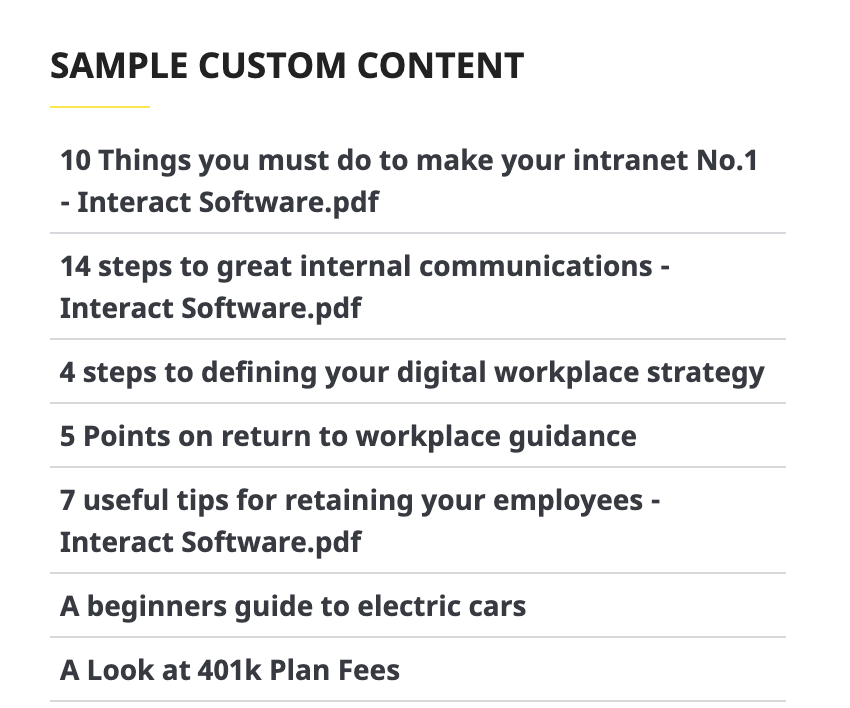
The code below performs a search for items with a specific hashtag, returns them in alphabetical order and displays them in a list:
<script>
// hashtag to limit on
var hashtag = "myhashtag"
// URL for the search API including the hashtag filter, and the alphabetical order
var url = "/api/search?hashtags=" + hashtag + "&limit=100&searchTerm=*&sortBy=Title";
// Perform the call to get the results from search
$.get(url, function(data){
// build out the html for the display of the results
var message = '<section class="Widget"><div class="titlelist peoplelisting"><div style="width:100%;"><ul class="unstyled striped">';
$.each(data.Results, function(i, e){
message += '<li><a target="_blank" href="' + e.Url + '"><span class="text" style="font-weight:600">' + e.Title + '</span></a></li>';
});
message += '</ul></div></div></section>';
// add the results to the widget
$(".htmlwidget-1").html(message);
});
// ensure that a scrollbar is visible if needed
$(".htmlwidget-1").parents(".widget-body").css("overflow","auto")
</script>
<div class="htmlwidget-1"> </div>
The script displays the search results in a list:
Note: Note the use of jQuery in this snippet. The ADK provides access to a suite of frameworks based on your needs, so you do not need to manage third-party dependencies in most cases.
Related
Section: Customise & extend