Embedding external apps
Before you start
- You need access to the Control Panel with permission to manage the App Development Kit.
Note: Examples in these pages are samples, not officially supported by Interact Technical Support, and should be reviewed and tested by your development team before use.
Overview
A common use case for ADK apps is to embed custom functionality from bespoke or internal systems, providing functionality that is not available through Interact directly. This can range from something like a restaurant menu to data dashboards, timesheets and scheduling.
Setup
You can create a Custom App (through Control Panel > App Development Kit) and create an iframe that embeds a third-party resource:
<iframe src="https://internal.system" />
Many use cases require some level of authentication in order to work.
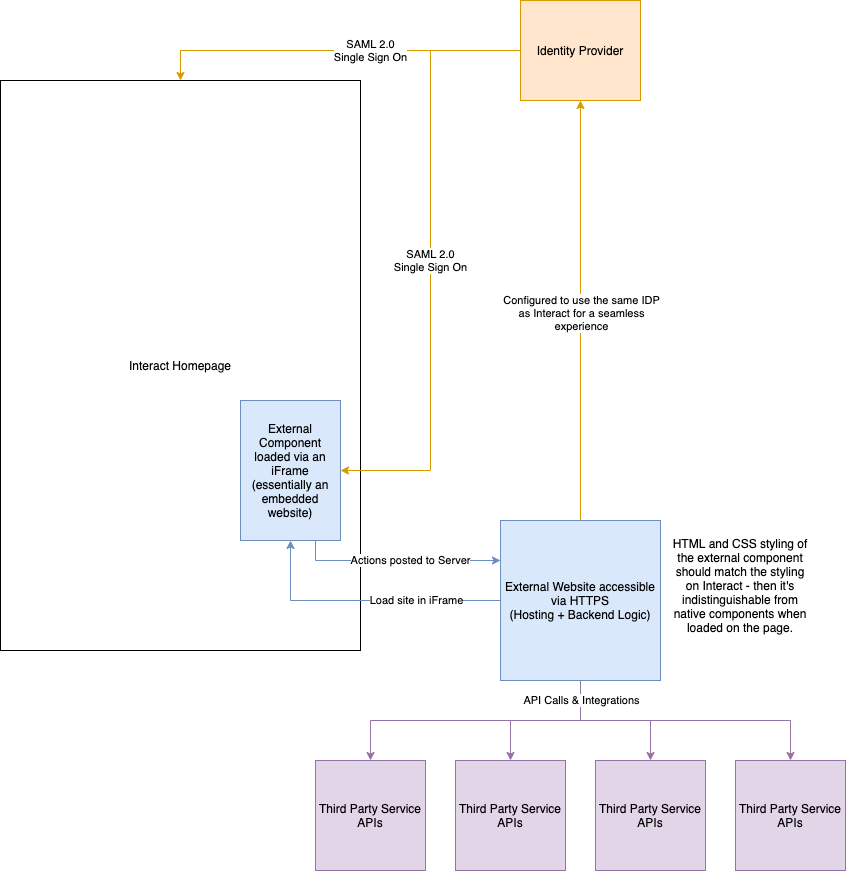
The diagram below shows one example of how a third-party system can be built and used in an iframe to allow features such as single sign-on through a shared SSO provider.
Look and feel
Make the contents of the iframe look and feel like your intranet. Include your intranet CSS in the iframed site and use the same classes that Interact uses. This applies colour themes, fonts and general styles to the iframed site.
To do this, find the path to the relevant CSS. The easiest way is to view the source of the page and look for the file intact.css:

You can then reference this file (including your domain name) from the website you are building, so that the same classes used by Interact for your theme are available in your website.
Note: This file path is tied to your theme. If the theme changes, you need to update the path to the CSS file in your website.
Additional guidelines
There are a number of requirements for a website that you want to host inside an iframe within Interact or any other website:
- The hosted site must use HTTPS. Interact is served securely over HTTPS, following best practice. Modern browsers therefore require any site hosted in an iframe to also be served over HTTPS.
- The hosted site, including any intermediate SSO sites, must allow itself to be served in an iframe. Some sites block being served in an iframe. This is not a problem if it is a website your organisation has built and manages.