Interact Advanced Analytics
Overview
Interact Advanced Analytics captures a wide range of transactional data, including page hits and dynamic events. You can access the raw analytics data through your BI tool of choice and analyse it as you wish. Use this data to build reports, visualisations, dashboards and usage models that are not available out of the box.
Advanced Analytics is a side-car component. It does not affect site performance under load or when you run heavy analysis. Data is encrypted in transit and at rest, with isolated storage per customer.
Advanced Analytics also supports configuration through the Developer Framework. This lets you enrich the data and events captured, for example by adding custom fields, controlling session length, or excluding certain user groups.
You can use Advanced Analytics with BI tools such as:
- Tableau
- Power BI
- Looker
- Qlik
- SAS BI
- SAP BusinessObjects
- Sisense
- Infor Birst
You can also access the data programmatically, for example in Python or Jupyter Notebooks.
Advanced Analytics schema
Main events table
The main table stores detailed information about each captured event. This includes information about the event, the person who triggered the event, the user journey, the device used and the request.
| Group | Field name | Field type | Description |
|---|---|---|---|
| Hosting | hosting_pod | string | Hosted pod name - EU, US |
| Tenant | tenant_guid | string | Tenant GUID in Interact's cloud ecosystem - can be retrieved from the /info path on the site domain |
| Versions | version_interact | string | Interact version |
| Versions | version_junejs | string | Version of the Advanced Analytics collector script |
| Person/User | person_id | string | Internal Interact Person ID |
| Person/User | person_ispoweruser | boolean | True if Power User, False otherwise |
| Person/User | person_timezone | string | Timezone set in the Interact profile |
| Person/User | person_primarycompany | string | Primary company set on the user's profile - the company may be renamed in the Interact UI to another entity by using System Text (for example, Primary Division) |
| Person/User | person_primarydepartment | string | Primary department set on the user's profile - the department may be renamed in the Interact UI to another entity by using System Text (for example, Primary Cost Center) |
| Person/User | person_primarylocation | string | Primary location set on the user's profile - the location may be renamed in the Interact UI to another entity by using System Text (for example, Primary Store Number) |
| Authenticated session | authentication_sessionid | string | Logged-in Session ID - not related to the interaction session/user journey session. It is reset every time the login session expires and needs to be refreshed. |
| Interactive session | session_interactionguid | string | Random GUID used to connect each interaction in the tracked session - stored in localStorage and reset if the session TTL is exceeded between two interaction points. |
| Interactive session | session_pageindex | int | Page number in the current user journey (interaction chain) - the session timeout resets to full time after each interaction. For example, a 30-minute threshold allows a maximum of 30 minutes between interactions before the session is considered ended. Starts at 0 for the first interaction, then increments with each page change. |
| Interactive session | session_interactionindex | int | Interaction number in the current user journey (interaction chain) - the session timeout resets to full time after each interaction. For example, a 30-minute threshold allows a maximum of 30 minutes between interactions before the session is considered ended. Starts at 0 for the first interaction, then increments with each interaction (page or dynamic event, such as a blog being liked). |
| Device | device_browserinfo | string | Parsed UserAgent info - browser name and browser version (space separated) |
| Device | device_useragent | string | User agent |
| Device | device_browserlanguage | string | Browser language |
| Device | device_browsergeolocationenabled | boolean | Does the browser have location services enabled? - measured with Modernizr |
| Device | device_browsertouchenabled | boolean | Is the browser touch enabled? - measured with Modernizr |
| Device | device_browserhtml5videoenabled | boolean | Does the browser have HTML5 videos enabled? - measured with Modernizr |
| Device | device_browsersvgenabled | boolean | Does the browser support SVGs? - measured with Modernizr |
| Device | device_screenresolution | string | Resolution of the screen (not browser size) |
| Device | device_browsercanvasenabled | boolean | Indicates HTML5 canvas support. |
| Device | device_browserorientationenabled | boolean | Indicates browser orientation support. |
| Event | event_name | string | Text representation of the event - for example, Liked blog - from the "Tracked events" table below |
| Event | event_id | string | The unique identifier of the event. |
| Event | event_subtype | string | Sub-classification of the event. |
| Request | request_pageloadduration | int | Time taken for the document.ready event to fire from the start of HTML rendering |
| Request | request_pagetitle | string | Title of the window tab |
| Request | request_url | string | URL of the loaded page |
| Request | request_interactmodule | string | Interact module inferred from the URL pattern - from the "Tracked modules" table below |
| Request | request_timestamputc | timestamp | UTC timestamp measured in the browser |
| Request | request_timestampusertime | timestamp | User's browser time measured in the browser (not based on the profile timezone set on the user's profile) |
| Request | request_ipaddress | string | Client IP detected on ingestion - not available for the referrer fields. |
| Referrer | referrer_pageloadduration | int | Time to document.ready event on the previous page (if any) |
| Referrer | referrer_pagetitle | string | Previous page title (if any) |
| Referrer | referrer_url | string | URL of the previous page in the interaction chain. |
| Referrer | referrer_interactmodule | string | Previous page module (if any) - from the "Tracked modules" table below |
| Referrer | referrer_timestamputc | timestamp | Previous page request timestamp (UTC time) (if any) |
| Referrer | referrer_timestampusertime | timestamp | Previous page request timestamp (user's time) (if any) |
| Custom fields | custom_field1 | string | Can be populated with any data you want - for example, EmployeeID, WorkdayID |
| Custom fields | custom_field2 | string | Can be populated with any data you want - for example, EmployeeID, WorkdayID |
| Custom fields | custom_field3 | string | Can be populated with any data you want - for example, EmployeeID, WorkdayID |
| Custom fields | custom_field4 | string | Can be populated with any data you want - for example, EmployeeID, WorkdayID |
| Custom fields | custom_field5 | string | Can be populated with any data you want - for example, EmployeeID, WorkdayID |
| Custom fields | custom_field6 | string | Can be populated with any data you want - for example, EmployeeID, WorkdayID |
| Custom fields | custom_field7 | string | Can be populated with any data you want - for example, EmployeeID, WorkdayID |
| Custom fields | custom_field8 | string | Can be populated with any data you want - for example, EmployeeID, WorkdayID |
| Custom fields | custom_field9 | string | Can be populated with any data you want - for example, EmployeeID, WorkdayID |
| Custom fields | custom_field10 | string | Can be populated with any data you want - for example, EmployeeID, WorkdayID |
| Autodetected info from CDN | autodetected_city | string | Pulled from the CloudFront headers (if present) - contains the name of the viewer's city. |
| Autodetected info from CDN | autodetected_country | string | Pulled from the CloudFront headers (if present) - contains the two-letter country code for the viewer's country. For a list of country codes, see ISO 3166-1 alpha-2. |
| Autodetected info from CDN | autodetected_countryname | string | Pulled from the CloudFront headers (if present) - contains the name of the viewer's country. |
| Autodetected info from CDN | autodetected_region | string | Pulled from the CloudFront headers (if present) - contains a code (up to three characters) that represents the viewer's region. The region is the most specific subdivision of the ISO 3166-2 code. |
| Autodetected info from CDN | autodetected_regionname | string | Pulled from the CloudFront headers (if present) - contains the name of the viewer's region. The region is the most specific subdivision of the ISO 3166-2 code. |
| Autodetected info from CDN | autodetected_latitude | string | Pulled from the CloudFront headers (if present) - contains the viewer's approximate latitude. |
| Autodetected info from CDN | autodetected_longitude | string | Pulled from the CloudFront headers (if present) - contains the viewer's approximate longitude. |
| Autodetected info from CDN | autodetected_metrocode | string | Pulled from the CloudFront headers (if present) - contains the viewer's metro code. This is present only when the viewer is in the United States. |
| Autodetected info from CDN | autodetected_postalcode | string | Pulled from the CloudFront headers (if present) - contains the viewer's postal code. |
| Autodetected info from CDN | autodetected_timezone | string | Pulled from the CloudFront headers (if present) - timezone in the detected location, in IANA time zone database format (for example, America/Los_Angeles). |
| Autodetected info from CDN | autodetected_androidviewer | boolean | Pulled from the CloudFront headers (if present) - set to true when CloudFront determines that the viewer is a device with the Android operating system. |
| Autodetected info from CDN | autodetected_desktopviewer | boolean | Pulled from the CloudFront headers (if present) - set to true when CloudFront determines that the viewer is a desktop device. |
| Autodetected info from CDN | autodetected_iosviewer | boolean | Pulled from the CloudFront headers (if present) - set to true when CloudFront determines that the viewer is a device with an Apple operating system. |
| Autodetected info from CDN | autodetected_mobileviewer | boolean | Pulled from the CloudFront headers (if present) - set to true when CloudFront determines that the viewer is a mobile device. |
| Autodetected info from CDN | autodetected_smarttvviewer | boolean | Pulled from the CloudFront headers (if present) - set to true when CloudFront determines that the viewer is a smart TV. |
| Autodetected info from CDN | autodetected_tabletviewer | boolean | Pulled from the CloudFront headers (if present) - set to true when CloudFront determines that the viewer is a tablet. |
| Application | is_mobile | boolean | Indicates whether the event came from the mobile application. |
| Search | search_id | string | Internal Interact Search ID. |
| Social Advocacy | socialadvocacy_channel | string | Channel used to share the page via the Social Advocacy feature. |
| Social Advocacy | socialadvocacy_url | string | URL attached to the Social Advocacy post. |
| Social Advocacy | socialadvocacy_postedcontent | string | Message added to the Social Advocacy post. |
| Social Advocacy | socialadvocacy_contentid | int | Internal Interact ID of the page shared via the Social Advocacy feature. |
| Content item | content_item_type | string | Type of the object on which the event was performed, for example 'FeedItem'. |
| Content item | content_item_id | int | Internal Interact ID of the object on which the event was performed. |
Search table
The search table stores additional information about the Search events. It tracks the type of search, the search term used and the total number of results.
| Field name | Field type | Description |
|---|---|---|
| event_id | string | The unique identifier of the event. |
| search_term | string | Phrase used to perform the search. |
| search_type | string | Search type. Possible values are "general_search" and "quick_search". |
| total_results | int | Total number of search results. |
| search_session_guid | string | The unique identifier of the search session. |
| captured_date_utc | timestamp | Timestamp of the record. |
Chosen search result table
The chosen_search_result table stores additional information about the Search Result Clicked events. It tracks details about the search results that were opened by the user.
| Field name | Field type | Description |
|---|---|---|
| event_id | string | The unique identifier of the event. |
| search_event_id | string | The ID of the Search event that returned the chosen search result. |
| url | string | URL of the search result. |
| title | string | Title of the search result. |
| type | string | Type of the search result. Possible values are "Page", "Category", "Profile", and others. |
| result_order | int | Index of the chosen result in the list of search results. |
| captured_date_utc | timestamp | Timestamp of the record. |
Person groups table
The person_groups table stores a person's groups for each recorded event. It indicates which groups the user belonged to at the time of the event. In Interact, these groups are known as Personas.
| Field name | Field type | Description |
|---|---|---|
| event_id | string | The unique identifier of the event. |
| group_id | int | Internal Interact ID of the group. |
| group_name | string | Group name. |
| captured_date_utc | timestamp | Timestamp of the record. |
Feed post table
The feed_post table stores additional information about the Feed Post Created events.
| Field name | Field type | Description |
|---|---|---|
| event_id | string | The unique identifier of the event. |
| feed_post_id | int | Internal Interact ID of the feed post. |
| feed_type | string | Type of the feed. Possible values are "Global" and "Community". |
| community_id | int | Internal Interact ID of the community. |
| community_name | string | Community name. |
| captured_date_utc | timestamp | Timestamp of the record. |
Feed post keywords table
The feed_post_keywords table stores hashtags and topics that were used to create the feed post.
| Field name | Field type | Description |
|---|---|---|
| event_id | string | The unique identifier of the event. |
| feed_post_id | int | Internal Interact ID of the feed post. |
| keyword | string | Topic or hashtag without the hash/pound sign. |
| keyword_type | string | Keyword type. Possible values are "Keyword" and "Topic". |
| captured_date_utc | timestamp | Timestamp of the record. |
Tracked events
| Area | Event name | Match criteria | HTTP method | Traffic type |
|---|---|---|---|---|
| Broadcasts | Visited Broadcast | loweredUrl == "/broadcasts" | GET | Page URL |
| Pulse | Visited Pulse | loweredUrl == "/pulse/auth/getloginlink" | GET | Page URL |
| General | Page Hit | Default | GET | Page URL |
| Blogs | Created blog | url == "/api/blog/" | POST | XHR |
| Blogs | Edited blog | url == "/api/blog/" | PUT | XHR |
| Blogs | Deleted blog | url == "/api/blog/" | DELETE | XHR |
| Blogs | Liked blog | /(api/blog/([0-9]+)/blog-post/([0-9]+)/like)$/.test(url) | POST | XHR |
| Blogs | Unliked blog | /(api/blog/([0-9]+)/blog-post/([0-9]+)/like)$/.test(url) | DELETE | XHR |
| Blogs | Saw who liked blog | /(api/blog/post/([0-9]+)/like)/.test(url) | * | XHR |
| Blogs | Liked blog comment | /(api/([0-9]+)/like)$/.test(url) | POST | XHR |
| Blogs | Unliked blog comment | /(api/([0-9]+)/like)$/.test(url) | DELETE | XHR |
| Blogs | Liked blog comment reply | /(api/([0-9]+)/reply/([0-9]+)/like)$/.test(url) | POST | XHR |
| Blogs | Unliked blog comment reply | /(api/([0-9]+)/reply/([0-9]+)/like)$/.test(url) | DELETE | XHR |
| Blogs | Saw who liked blog comment | /(api/person/0/timeline/([0-9]+)/like)$/.test(url) | * | XHR |
| Blogs | Saw who replied to blog comment | /(api/blog/([0-9]+)/blog-post/([0-9]+)/comment/([0-9]+)/reply)/.test(url) | GET | XHR |
| Blogs | Commented on blog | /(api/blog/([0-9]+)/blog-post/([0-9]+)/comment)$/.test(url) | * | XHR |
| Blogs | Subscribed to blog | /(api/blog/([0-9]+)/person/([0-9]+)/subscribe)$/.test(url) | * | XHR |
| Blogs | Unsubscribed from blog | /(api/blog/([0-9]+)/person/([0-9]+)/unsubscribe)$/.test(url) | * | XHR |
| People | Followed user | /(api/people/followers/([0-9]+))$/.test(url) | PUT | XHR |
| People | Unfollowed user | /(api/people/followers/([0-9]+))$/.test(url) | DELETE | XHR |
| People | Endorsed user | /(api/people/([0-9]+)/expertise/([0-9]+)/endorsement)$/.test(url) | POST | XHR |
| People | Removed endorsement | /(api/people/([0-9]+)/expertise/([0-9]+)/endorsement)$/.test(url) | DELETE | XHR |
| Timeline | Posted to timeline | /(/api/person/([0-9]+)/timeline)$/.test(url) | POST | XHR |
| Timeline | Deleted post in timeline | /(/api/person/([0-9]+)/timeline/([0-9]+))$/.test(url) | DELETE | XHR |
| Timeline | Liked timeline | /(api/person/([0-9]+)/timeline/([0-9]+)/like)$/.test(url) | POST | XHR |
| Timeline | Unliked timeline | /(api/person/([0-9]+)/timeline/([0-9]+)/like)$/.test(url) | DELETE | XHR |
| Timeline | Replied to timeline post | /(api/person/([0-9]+)/timeline/([0-9]+)/reply)$/.test(url) | POST | XHR |
| Timeline | Liked timeline reply | /(api/person/([0-9]+)/timeline/([0-9]+)/reply/([0-9]+)/like)$/.test(url) | POST | XHR |
| Timeline | Unliked timeline reply | /(api/person/([0-9]+)/timeline/([0-9]+)/reply/([0-9]+)/like)$/.test(url) | DELETE | XHR |
| Social Advocacy | SA Share | Raised when the user shares a page via the Social Advocacy feature | * | JavaScript Event |
| Social Advocacy | SA Clickthrough | /public/il/{{link_id}} | * | Page URL |
| Search | Search | Raised when the user searches for something in Quick or General Search | * | JavaScript Event |
| Search | Search Result Clicked | Raised when the user opens a search result from Quick or General Search | * | JavaScript Event |
| Feed | Feed Post Created | Raised when the user posts to the Feed | * | JavaScript Event |
| Feed | Liked Feed Item | Raised when the user likes a Feed Item | * | JavaScript Event |
| Feed | Commented on Feed Item | Raised when the user comments on a Feed Item | * | JavaScript Event |
| Feed | Feed Item Impression | Raised when the Feed Item takes at least 80% of the viewport | * | JavaScript Event |
Tracked modules
| Module name | Match criteria | HTTP method | Traffic type |
|---|---|---|---|
| Absence Booking | loweredUrl.includes("absencebooking2") | GET | Page URL |
| Administration | loweredUrl.includes("admin") | GET | Page URL |
| Analytics | loweredUrl.includes("analytics") | GET | Page URL |
| Blog | loweredUrl.includes("blog/blog") | GET | Page URL |
| Broadcasts | urlObj.pathname == '/broadcasts' or urlObj.pathname == '/broadcasts/create' | GET | Page URL |
| Business Contacts | loweredUrl.includes("contacts") | GET | Page URL |
| Calendar | loweredUrl.includes("calendar") | GET | Page URL |
| Calendar | loweredUrl.includes("addeditcalendar") | GET | Page URL |
| Case Management | loweredUrl.includes("/cmm2") | GET | Page URL |
| Category | loweredUrl.includes("pages/section/sub") | GET | Page URL |
| Content Area / Team Homepage / Homepage | loweredUrl.includes("section/default.aspx") | GET | Page URL |
| Developer Framework | loweredUrl.includes("/developerframework") | GET | Page URL |
| Developer Framework | loweredUrl.includes("developer") | GET | Page URL |
| Error Page | loweredUrl.includes("error") | GET | Page URL |
| Expenses | loweredUrl.includes("expenses") | GET | Page URL |
| Football | loweredUrl.includes("footballv4") | GET | Page URL |
| Forums | loweredUrl.includes("forum") | GET | Page URL |
| Gallery | loweredUrl.includes("gallery") | GET | Page URL |
| Getting Started | loweredUrl.includes("/gettingstarted") | GET | Page URL |
| Homepage | loweredUrl.includes("default.aspx?homepage=") | GET | Page URL |
| Homepage | loweredUrl.includes("/home/") | GET | Page URL |
| Manage Homepages Admin | loweredUrl.includes("/managehomepages") | GET | Page URL |
| Homepage edits | loweredUrl.includes("/zones") | GET | Page URL |
| Manage IP Addresses | loweredUrl.includes("/manageipaddresses") | GET | Page URL |
| Mandatory Reads | loweredUrl.includes("mandatoryread") | GET | Page URL |
| Media Manager | loweredUrl.includes("content/media") | GET | Page URL |
| Network Directory | loweredUrl.includes("networkdirectory") | GET | Page URL |
| Notifications | loweredUrl.includes("notifications") | GET | Page URL |
| Organogram | loweredUrl.includes("organogram") | GET | Page URL |
| Organogram | loweredUrl.includes("organagram") | GET | Page URL |
| Other | Default | GET | Page URL |
| Page | loweredUrl.includes("document.aspx") | GET | Page URL |
| Page | loweredUrl.includes("interactv7/composer/") | GET | Page URL |
| Page Editor | loweredUrl.includes("composer/upload") | GET | Page URL |
| Page Editor | loweredUrl.includes("composer.aspx") | GET | Page URL |
| People Directory | loweredUrl.includes("modules/directory/") | GET | Page URL |
| People Directory | urlObj.pathname == '/person' | GET | Page URL |
| Profile | /\person/([0-9]+)/.test(loweredUrl) | GET | Page URL |
| Polls | loweredUrl.includes("/poll") | GET | Page URL |
| Rewards | loweredUrl.includes('settings/people/reward') | GET | Page URL |
| Room & Resource | loweredUrl.includes("roombooking") | GET | Page URL |
| Search | loweredUrl.includes("search") | GET | Page URL |
| SharePoint Admin | loweredUrl.includes("/sharepointconnection") | GET | Page URL |
| Short URL Admin | loweredUrl.includes("/shorturl") | GET | Page URL |
| System Text Admin | loweredUrl.includes("/systemtext") | GET | Page URL |
| Tasks | loweredUrl.includes("tasks") | GET | Page URL |
| Team Blog | loweredUrl.includes("blog/teamblog") | GET | Page URL |
| Team Blog | loweredUrl.includes("blog/addeditteam") | GET | Page URL |
| Teams | loweredUrl.includes("directory/interactteams.aspx") | GET | Page URL |
| Teams | loweredUrl.includes("directory/teams") | GET | Page URL |
| Training Manager | loweredUrl.includes("/trainingmanager") | GET | Page URL |
| UMI | loweredUrl.includes("/umi") | GET | Page URL |
| Workflow & Forms | loweredUrl.includes("workflow") | GET | Page URL |
Query performance tuning
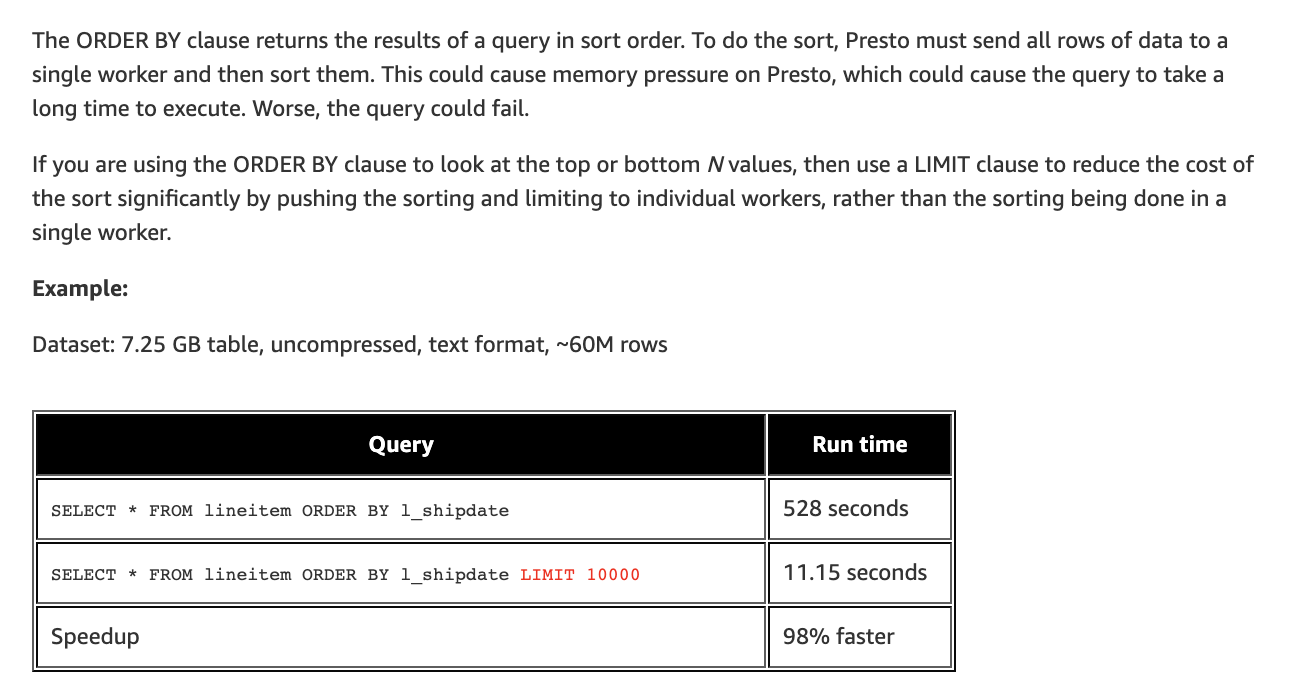
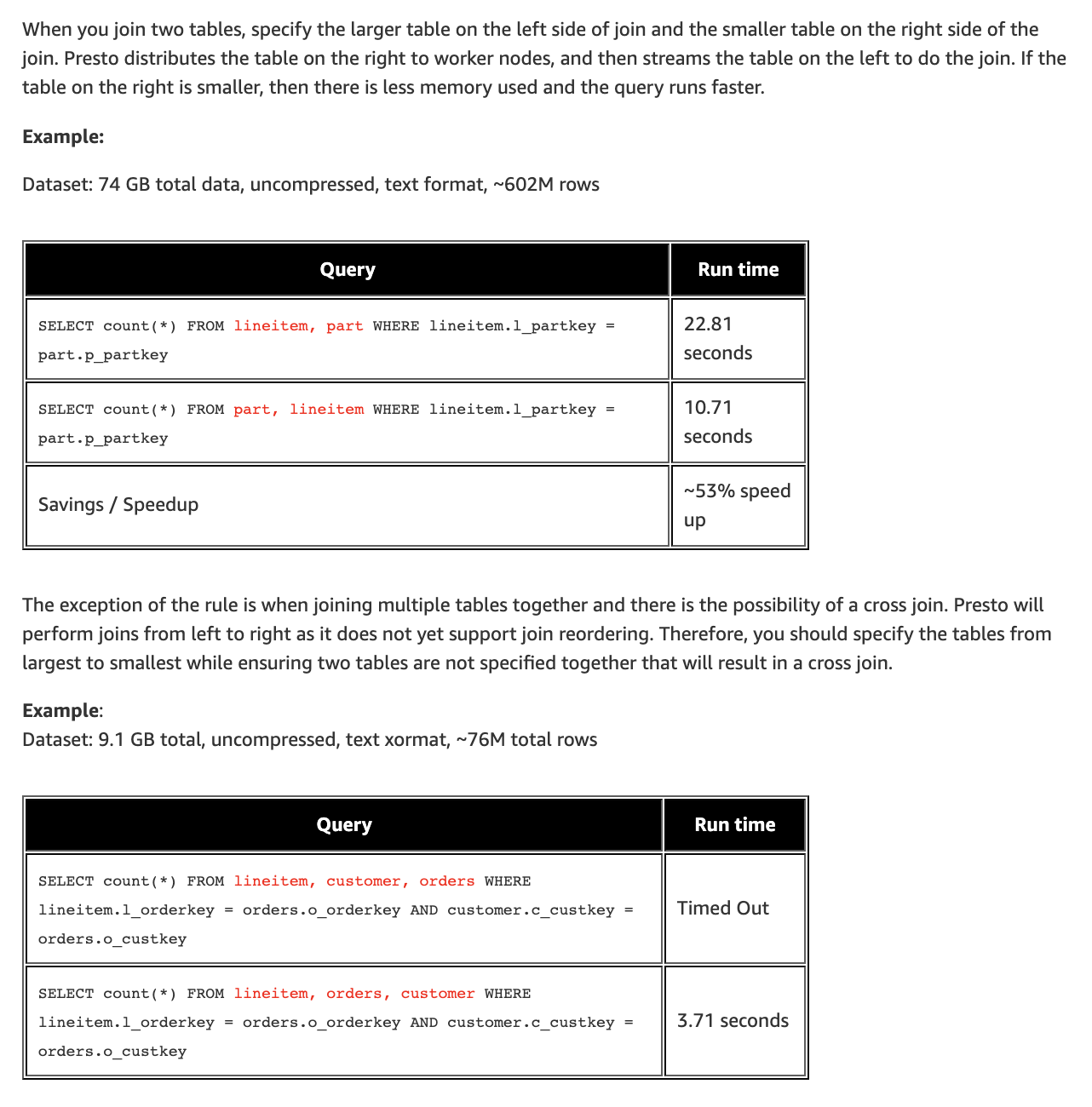
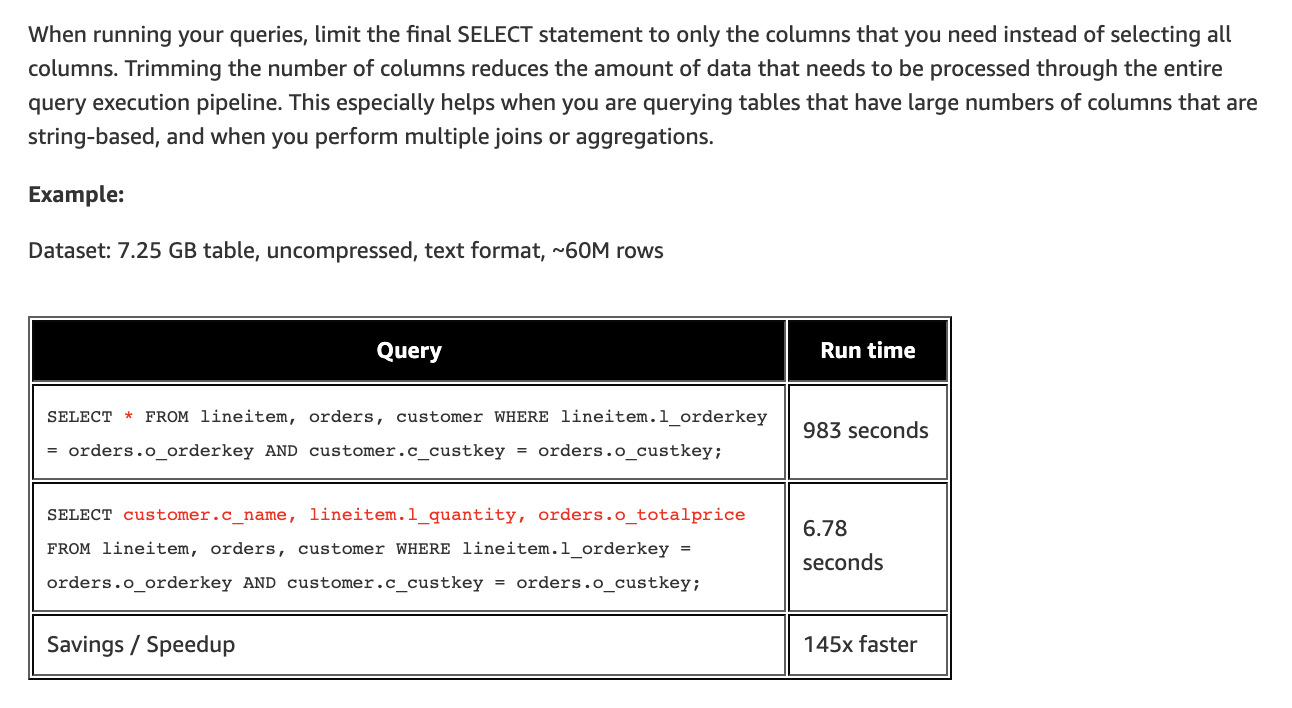
These AWS resources help you optimise query performance through better use of joins, ordering and column selection, and by loading only the most relevant data (for example, the last three months rather than all time).
Useful excerpts follow.
ORDER BY
JOINS
Column selection
Functionality support
Interact Advanced Analytics is based on the AWS Athena Engine 2, which includes major improvements over version 1. See the Athena engine versions reference.
Browser-side vs server-side tracking
Interact Advanced Analytics captures a wide range of events and user context. The service relies on browser-side tracking for event collection, in contrast to the out-of-the-box analytics, which are tracked server side.
Both approaches have strengths and weaknesses, ranging from flexibility to tracking success rate.
Browser-side events are flexible. They support custom attributes and custom events, and they work in line with industry best practice for tracking pixel services. They rely on scripts running in the user's browser. This flexibility comes at a cost: the tracking pixel may not always fire, which can lead to small deviations in numbers compared with server-side tracking. This can be caused by user behaviour (navigating before the page fully loads), browser settings, connectivity and other time-sensitive factors.
Server-side tracking always captures interactions as they happen, because it runs server side. This ensures a high level of reliability and consistency. Because it does not rely on the user's browser environment, it is unaffected by ad blockers, script delays or premature navigation. This makes it suitable for capturing key transactional data, such as logins, form submissions or back-end API calls. However, server-side tracking is typically less customisable for capturing rich user context or behavioural metadata (for example, viewport size, scroll depth or client-side interactions), which are better handled with browser-based methods.
In summary, browser-side tracking helps you understand patterns, intricate interactions and campaign-specific information where a small degree of inaccuracy can be tolerated (for example, where some events are not tracked). It lets you examine individual user sessions to understand steps, flow and timings.
Server-side tracking is best where flexibility is not essential but absolute accuracy in numbers is needed. Mature analytics strategies often combine both methods, using browser-side and server-side tracking together to build a comprehensive and reliable picture of user engagement.