Hide the like button
Use custom CSS to hide the like button on content pages throughout Interact.
Before you start
- You need access to the Control Panel with permission to manage the Developer Framework.
Note: This example is a sample, not officially supported by Interact Technical Support. Review and test it with your development team before use.
Overview
With MasterPage CSS you can hide certain features within Interact that cannot be removed through application variables or licence settings. A commonly requested change is to remove the like button on content pages.
The CSS
Add the following CSS to the MasterPage CSS area of the Developer Framework. It applies on every page within Interact. The like button can be identified by its ID, btnLike.
#btnLike {display:none;}
To find the ID of the button, inspect the element using your browser's developer tools.
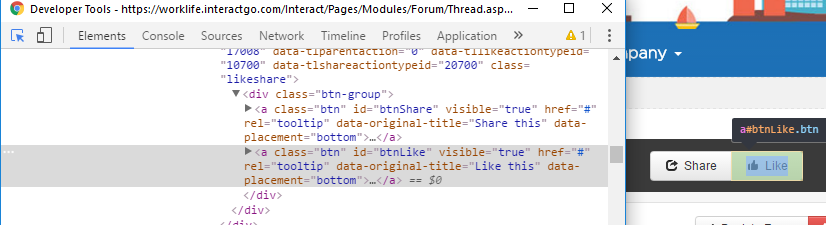
This removes the like button anywhere it would normally appear in Interact.
Related
Section: Customise & extend